
Sometimes some of my blog comments get sent to spam and I don’t see them until two weeks later when I normally do a check up on my spam folder. I’ll then move those back to the inbox. Unfortunately at that point all of the mail is mixed throughout pages and pages and pages of gmail and its a pain to get to the “unread” mail.
You can access “unread” mail a couple ways.
- From the inbox, go to the Search Options, then click on “Search” drop down and select “unread” (screen shot below)
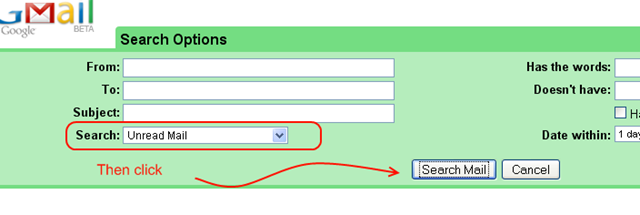
You will now see all of your unread email.
Or … now this one is my favorite because its quick.
- From the inbox type the following into your search box (without the quotes): “label:unread”
- Click search
- You’ll see all of your unread email (screen shot below)
label:unread is a hidden label that applies to your “unread” email.

Nothing huge, but it saves a few clicks. Clicks == time!